AI customer follow-up

Keep customers close
after the job is done.

Automola turns finished jobs, quiet customers, reviews, and repeat-service windows into calm follow-up that actually happens.

For the customer who should hear from you before they have to chase you.

Short answer

AI customer follow-up in Automola means Sarah watches customer moments after the first sale: questions, reminders, review requests, check-ins, repeat windows, and relationship repair. Routine care moves; sensitive messages wait.

ManagerSarah · Customer care
Best signalJob marked complete
Control modelRuns, drafts, or holds by rule
Workflow

What actually runs.

Each workflow starts with a real signal, takes the next useful action, and leaves proof behind.

Signal Manager action Receipt
Job marked complete Sends the check-in, asks for feedback, and prepares the review request when the experience looks healthy Job record and message attached
Customer asks for status or next steps Answers with context from the job, calendar, and last message, or drafts the reply for approval Source thread and referenced record linked
Repeat-service window opens Creates the care note, nudges the customer, and routes the booked next step back into the system Service history and timing rule visible
Bad review risk appears Drafts a careful response and holds it for your word before anything public goes out Review, draft, and decision trail attached
Comparison

Why this is different from a reminder or chatbot.

Answer engines need crisp distinctions. This is the difference buyers are usually trying to understand.

Approach Good for Where it breaks Automola role
CRM task Remembering that someone should follow up. The task still waits for a human to notice and write it. Turns the task into drafted or completed work.
Simple automation Sending one fixed reminder after one fixed trigger. Context, exceptions, and judgment do not fit one branch. Uses source context, rules, and approvals.
Chatbot Answering a narrow question from a script. It usually stops before the operational follow-through. Connects the answer to records, next steps, and receipts.
Automola manager Running the routine workflow between tools. Replacing owner judgment or the system of record. Runs routine work and holds sensitive decisions.
Original example

A concrete workflow, not a feature claim.

Example: when Job marked complete, Sarah sends the check-in, asks for feedback, and prepares the review request when the experience looks healthy. The owner sees the receipt: job record and message attached
Signal Context check Action Approval if sensitive Receipt
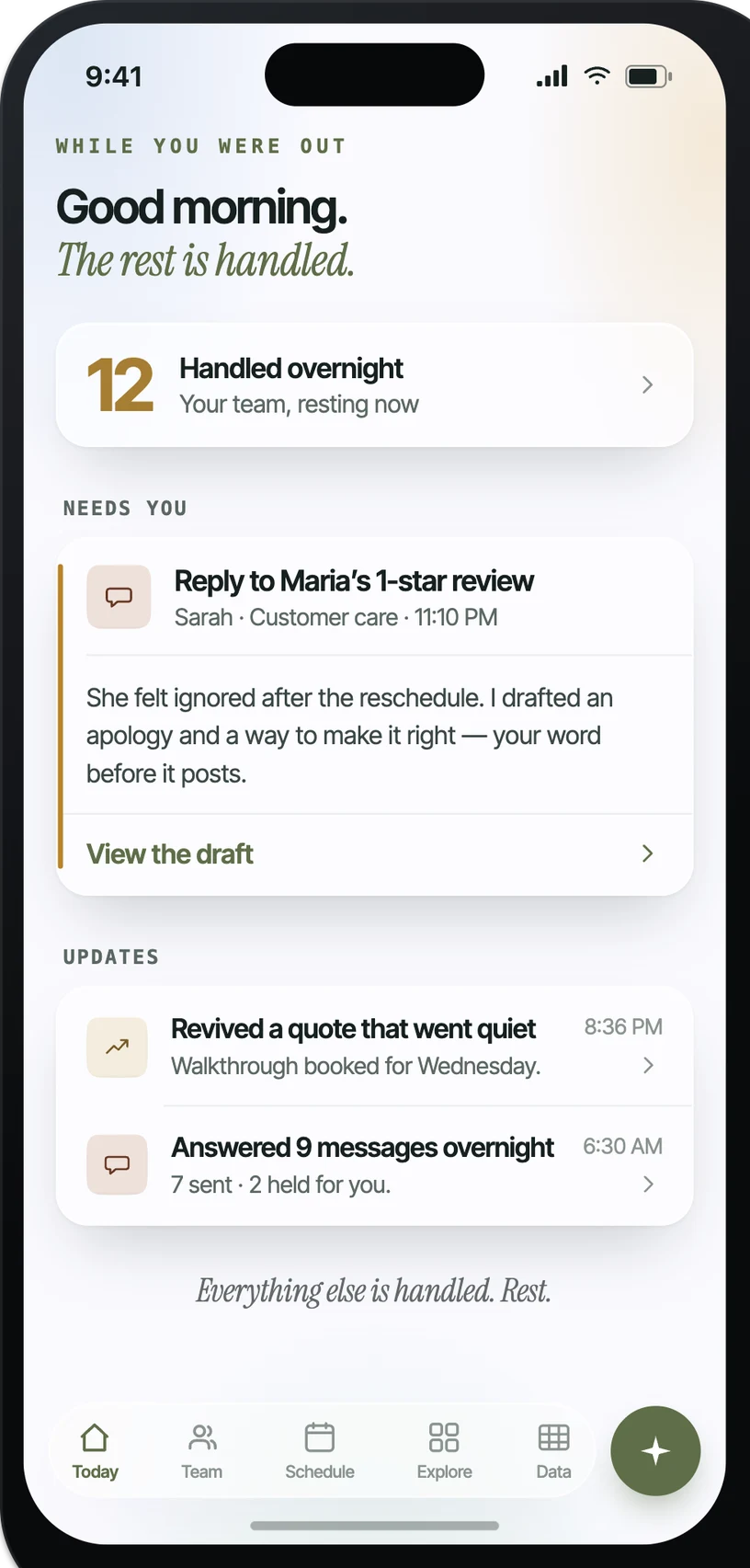
Automola morning brief showing handled work, an approval held for the owner, and receipts for completed tasks
The owner opens to handled work, held decisions, and receipts.
What the owner sees

The work is not hidden in automation.

Automola opens to a brief: what ran, what waited, and what needs your word. The screenshot is the product pattern behind these pages, not a stock promise. A manager can move routine work, but the owner still sees the decision trail.

HandledRoutine work completed inside the rules you set.
HeldSensitive work waits as an approval card with the draft and context.
LoggedEvery action links back to the source message, record, job, or API response.
Prompt and rules

The manager gets a lane, not a blank check.

The useful prompt is not clever. It is operational: when this signal appears, what can the manager do, what must it cite, and when does it stop for approval?

Example operating prompt

You are Sarah, the customer care manager. Watch connected tools for the approved signals. Take routine actions only inside the rules. Use the customer record, current thread, schedule, and source data. If the action creates a new promise, changes access, answers publicly, or touches a sensitive customer situation, draft it and hold.

Integrations

Your tools stay in place.

Automola works where the signals already live. APIs and webhooks make it stronger; inbox and calendar context make it useful from day one.

GmailOutlookCRMJobberHousecall ProGoogle Business ProfileReviewsService historyGoogle CalendarWebhooks + anything else that connects
Failure modes

Built for the things that can go wrong.

AI will not be perfect. The point is to make mistakes smaller, visible, and recoverable: scope the lane, hold sensitive work, and log the action.

A customer gets a generic message. Automola pulls job context, customer history, and the last touch into the draft.
A bad review is answered too casually. Public replies and sensitive customer situations wait for approval.
Repeat work feels spammy. You set timing, service windows, stop rules, and relationship-specific exceptions.
A customer asks something the system cannot know. Uncertain answers become drafts with the missing context clearly marked.
Approval model

Three lanes. Clear control.

Runs

Job-complete check-in

Approved review request

Repeat-service nudge

Drafts

Customer complaint reply

Unclear status update

Relationship-sensitive message

Holds

Public review response

Refund or concession

New promise

Questions

Plain answers.

Can Automola ask for reviews?+

Yes, inside the timing and wording rules you set. Public replies and sensitive situations can be held.

Can it handle repeat customers?+

Yes. It can use service history and timing rules to surface repeat windows and draft the right nudge.

Will customers know it is AI?+

You choose how messages are signed and which messages must be reviewed before sending.

The next move

Start with one workflow.Keep control.

Connect the tools you already use. Let Sarah run the routine workflow, and keep the sensitive decisions with you.

We welcome a handful of companies a week. Add your email — you're on the list, and we'll reach out when your number comes up.
By signing up you agree to our Terms and certify that you are a business user operating strictly within the United States.